A voice-assisted eBay listing tool for sellers who want more than photo-only AI
Photo-only AI is fast. But photos alone miss condition, origin, year, price, and the small details that separate a good listing from a returned item.
Folder Lister combines image analysis with short voice notes, lets you review every AI suggestion before it touches eBay, and connects the result to reusable profiles, saved specifics, and multi-variation editing. It is built for eBay sellers who want workflow structure, not just speed.
Desktop app for Windows. Free to start. eBay-only focus.
Most AI listing tools stop at the photo. Folder Lister starts there.Image analysis handles what the camera can see. Voice notes handle what only the seller knows. The result is a more complete draft with fewer gaps for the buyer to question.
Three things that separate a voice-assisted workflow from photo-only automation.
Voice + image, not photo-only AI
Photos identify colour, brand, shape and category. Voice adds condition, origin, era, dimensions, price and flaws. Together they fill more item specifics than either source alone, and eBay confirmed that complete specifics improve search visibility.
Review before apply, not blind automation
Every AI suggestion shows a confidence percentage and a checkbox. You set a threshold, review what the AI found, and decide what to apply. Nothing reaches eBay without your approval. The Web Editor is the final review before publishing.
Profiles, grouped listings, variation growth
AI handles the first draft. But repeat stock, collection groups, and evolving variation listings need reusable structure. Profiles save categories, specifics, and policies. The variation editor lets you reopen existing multilistings and add unsolds without rebuilding.
Workflow Fit
This page is about finding the right tool for your eBay workflow, not abstract AI claims.
Where Folder Lister connects AI to real workflow
The AI draft is the starting point, not the finish line. Folder Lister connects what the AI produces to the parts of eBay listing work that photo-only tools typically skip:
Reusable profiles with saved categories, specifics, and policies
Cross-country setups for sellers listing on multiple eBay sites
Multi-variation editing for growing grouped listings over time
Adding unsold singles into existing multilistings from local folders
Final review and bulk editing in the Web Editor before publishing
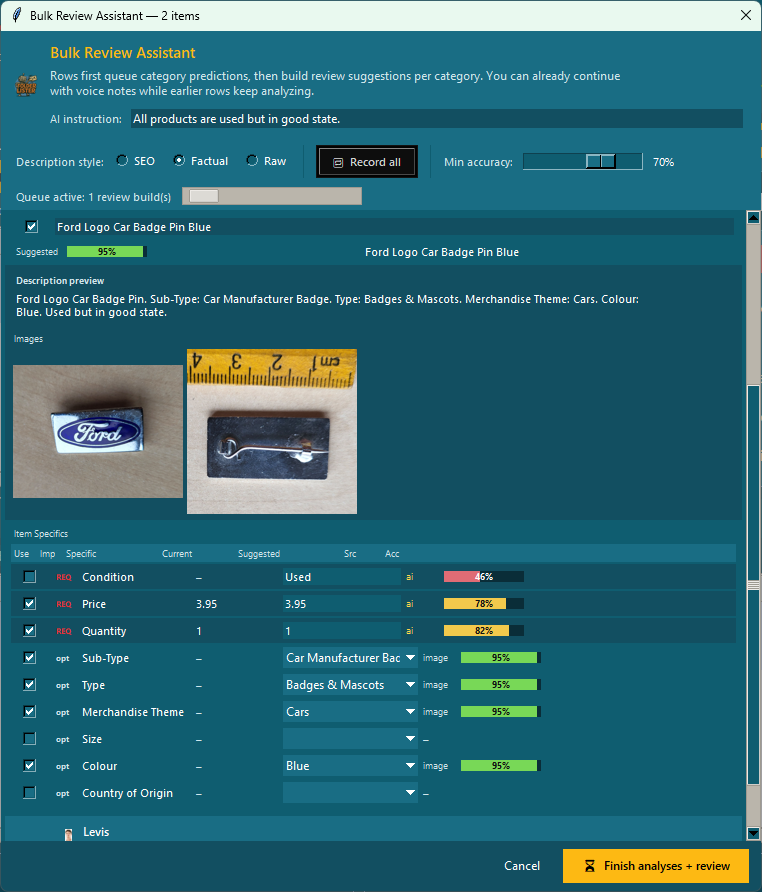
The Bulk Review Assistant shows AI predictions per item with source and accuracy columns. The seller reviews before applying.
Why Sellers Compare
Why sellers start looking beyond photo-only AI for their eBay listings.
Photos alone miss too much item truth
A photo can show that something is blue and ceramic. It cannot reliably tell you it is from 1960s Holland, has a hairline crack on the base, or should be priced at 24.95. For eBay categories with detailed item specifics, the gap between what the camera sees and what the buyer needs to know is where listings lose trust.
Direct-post AI is fast but risky for nuanced items
One-click photo-to-eBay tools are built for speed. That works for simple, new, mass-produced items. For vintage, used, or condition-sensitive stock, auto-posting without review can produce listings with wrong specifics, missing flaws, or AI-hallucinated details that lead to returns and negative feedback.
One-off speed tools miss reusable setup
Many AI listing tools are designed for one-off speed: photograph, generate, post. That is useful for the first listing. But sellers with repeat stock, recurring categories, or growing variation listings need structure that carries over. Profiles, saved specifics, and folder-based workflows compound speed over time.
Compare
How Folder Lister compares with other eBay AI listing approaches. Based on each tool's current public positioning.
Capability
Folder Lister
eBay AI
RGLister
LazyLister
Shelvio
Broad hosted tools
Main input
Photos + voice notes
Photos, barcode
Photos
Photos
Photos + voice
Templates, imports, CSV
Voice support
Built into listing flow
Not public
Not public
Not public
Core feature
Not typical
Review before apply
Confidence % + checkboxes
Editable draft
Positions as auto-post
Positions as direct post
Not fully documented
Varies by tool
Built for eBay specifically
eBay-only
eBay native
eBay-focused
eBay-focused
Multi-platform
Multi-marketplace
Reusable profiles / saved specifics
Profiles + folder mapping
No
Not public
Not public
Not public
Templates, some imports
Single items + collections
Both workflows
Single item focus
Batch photos
Batch processing
Batch photos
Usually batch/import
Multi-variation editing
Reopen + add unsolds
Limited
Not public
Not public
Not public
Some tools
Desktop or cloud
Desktop (Windows)
Web / mobile
Web
Web / mobile
Mobile-first
Cloud / web
Best fit
eBay sellers wanting voice + image AI with reusable workflow structure
Quick single listings from phone photos
Fast photo-to-listing automation
Batch photo-to-listing speed
Mobile-first voice reselling across platforms
Multi-marketplace management
Right Fit
No tool is the right fit for everyone. Here is an honest breakdown.
Choose Folder Lister when
You want voice + image together for more complete drafts
You want to review AI output before it reaches eBay
You work with single items, collections, or evolving grouped listings
You want reusable profiles, saved specifics, and folder-based structure
You want to add unsold items into existing multilistings
You list on eBay specifically and want a focused eBay workflow
You want a final review in a web editor before publishing
Choose another tool when
You mainly want one-click photo-to-post automation for simple, new items
You need multi-marketplace crosslisting (eBay + Amazon + Poshmark etc.)
You want a mobile-first app more than a desktop workflow
You need order management, inventory sync, or shipping integration
You prefer cloud-hosted templates over local folder-based setup
FAQ
Is Folder Lister a voice-assisted eBay listing tool?
Yes. Folder Lister combines AI image analysis with short voice notes to build reviewable eBay listing drafts. The seller speaks price, condition, origin, and other facts while the AI handles visual attributes. Nothing is auto-published — every suggestion goes through review first.
How is Folder Lister different from photo-to-listing AI tools?
Photo-only tools generate listings from images alone. Folder Lister adds voice input for facts the camera cannot see, uses a review-before-apply model with confidence percentages, and connects the AI output to reusable profiles, saved specifics, and multi-variation editing.
Does Folder Lister auto-publish AI output?
No. Every AI suggestion shows a confidence percentage and a checkbox. You set a threshold, review what the AI found, and apply only what you trust. The Accurate AI Assistant page explains this model in detail.
Do I need folders to use the AI workflow?
No. You can add individual files with Add files, select multiple photos, or load a whole folder. The AI workflow works with any number of items.
Can Folder Lister help if I sell one-off items?
Yes. The voice + image workflow is designed for one-off items where each listing needs its own category and specifics. When items become repetitive, profiles and saved setups take over to speed up the repeat work.
Can I add unsold singles into an existing multi-variation listing?
Yes. The variation editor can reopen an existing multi-variation listing, add new or unsold items from local folders, and bulk edit prices, quantities and images without rebuilding.
Should I choose Folder Lister or a broader crosslisting tool?
Folder Lister is built specifically for eBay. If you mainly need multi-marketplace crosslisting, inventory sync, or order management, a broader hosted tool is a better fit. If your priority is faster eBay listing creation with voice + image AI and reusable setup, Folder Lister is more focused. See the speed guide for more on the workflow philosophy.