What it uses
- Item images already loaded in Folder Lister
- A short voice note or typed memo
- Existing profile or category context when you use profiles
- Your configurable prompt for tone, structure and SEO
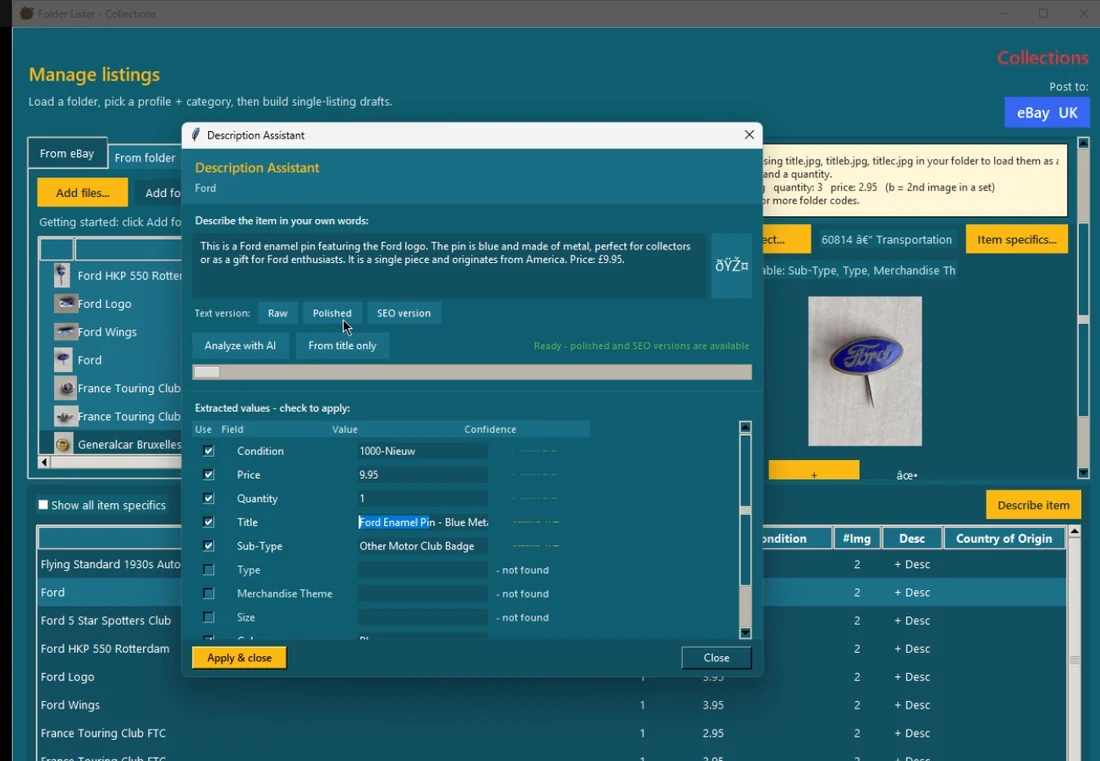
Folder Lister's Voice AI Assistant is a review-first eBay listing workflow. It combines item images with a short voice memo or typed note to suggest category, specifics, price, quantity, title and description fields in one review window.
Nothing is auto-applied. The seller reviews the returned fields, keeps what looks right, and skips the rest. Confidence colors make that review readable at a glance.
“19.95, China, boxed figure.”
Nothing is auto-applied. Review the fields, tick what you want, then apply.
Folder Lister combines visual clues from item images with a short spoken or typed memo of seller facts. It turns both into a structured eBay listing draft, guided by your prompt for tone, structure and SEO, without handing final control to AI.
In plain terms: the photo supplies clues, you supply facts the photo cannot safely know, and the output is a draft you review before applying anything.
Best for repeat stock with title codes.
Best for sellers of collectables with unique item details.
The benchmark proves the batch engine; the AI workflow adds seller knowledge and review control. Watch the classic title-code benchmark.
You already describe items in your head: what it is, what it is made of, whether the condition note matters, what variant it is and what price you want. Generic AI cannot reliably see all of that from an image alone. A seller can. The Voice AI Assistant captures that seller knowledge faster, turns it into cleaner copy, and keeps the final choice with you.
Need the bigger picture behind this workflow? Read the guide How to speed up eBay listings without letting AI take over.
The classic title-code benchmark shows 100 listings with 200 images prepared in about 9 minutes. The AI-assisted image and voice workflow uses the same fast item-to-item structure without requiring a pre-defined filename structure, but the final pace still depends on how complex the items are and how much review each batch needs.
Folder Lister is built for sellers who list in batches. A full collection session moves through items at a pace that individual app-based workflows cannot sustain.
For most items, a photo and a short spoken memo — price, condition, quantity — covers what the listing needs. Both inputs combine before the review window opens so you are not manually entering the same details into separate fields.
When working through a batch, Folder Lister supports a sequential voice capture flow — move through items one by one, speak a short note for each, then review and apply in a final pass. Voice records while images scan in parallel.
The point is not to let AI invent your listing. The point is to combine image analysis, category predictions and your own seller facts in one reviewable workflow.
Start from the item images inside Folder Lister. The assistant can use that context to suggest likely eBay categories and extract listing clues before you add the missing facts.
Use a short voice memo for the facts images cannot safely know on their own, such as price, quantity, country of origin, condition or a quick specifics correction.
Returned values come back with confidence colors and checkboxes so you can scan what looks strong, what needs a review and what should stay untouched until you approve it.
Folder Lister's voice input is built around factual dictation — you say what you know about the item and the assistant extracts the specific values. Not narrating for a general AI. Just the facts, as structured fields.
The most effective voice memos are short and factual. Instead of describing an item for a general AI to interpret, you state what you know: price, condition, what is included, which variant, country of manufacture. This is the factual-only approach — speak the fields, not a story.
The factual only setting produces the most reliable extracted values when the memo sticks to verifiable item facts rather than promotional language. These are the field types it handles well:
Each fact becomes a field in the review window. Tick what looks correct and skip what does not. Nothing is applied automatically.
Green values look stronger, amber values deserve a quick check, and red values tell you not to trust the guess without seller review. Checkboxes keep every suggested field optional.
Folder Lister is built around a supervised AI workflow. AI contributes suggestions with confidence scores. The seller decides what gets applied. That is the fundamental design choice that separates it from tools where AI publishes or pre-fills without a structured review step.
A supervised AI workflow does not ask AI to invent facts about an item. It asks AI to help organize the facts the seller already knows. The voice memo carries the seller's knowledge. AI turns it into structured fields. The seller verifies — not the other way around. This is why Folder Lister calls the final step "apply selected fields" rather than "publish draft."
When AI applies values directly — title, specifics, price — small errors compound across a large batch. A single wrong category or missing condition note gets multiplied by every listing it touches. Supervised apply means each field decision is visible before it becomes part of a live listing. At 50+ items per session, that visibility matters.
Every suggested field comes back with a confidence level. Green looks reliable based on the combined image and voice context. Amber deserves a quick check. Red means the guess is weak and seller judgment should override it. The colors make the review fast — you are not reading every field, you are scanning for amber and red.
Nothing in the review window is pre-checked or auto-applied. You scan the returned values, tick the ones that look right, and apply only those. Skip a field and it stays out of the draft entirely — the listing does not carry the AI's guess unless you confirm it.
In a supervised AI workflow, the final apply action is a deliberate step, not a side effect. Folder Lister is designed so that no value enters the live draft without passing through the review-and-confirm step first. Speed comes from making that step fast — not from removing it.
Many items have subtle differences that matter: apparel sizing, toy variants, regional releases, small material changes or condition notes that matter more than the photo can tell. That is where seller input and reviewable AI work best together.
You often know things a model cannot see with certainty: whether the back is metal, whether it is enamel, whether it is an original, which edition it is, or why one small detail matters.
You can speak the price, type it, or leave it alone. The assistant can help structure the listing, but you still decide the actual asking price.
Instead of rewriting the same facts into separate fields, you say them once and let Folder Lister spread them across title, description, quantity, price and item specifics.
The real split is not just AI or no AI. It is whether the workflow lets AI do everything in one go, or uses AI inside a structure that still scales and stays reviewable. This comparison includes mobile-first AI listing apps, multi-account eBay tools and crossposting platforms.
Fast to start. Feels magical. Often turns generic the moment items get more niche, condition-heavy or category-sensitive.
More setup at the start, but better control, cleaner review and stronger speed once you are moving through real volume. Folder Lister is deliberately trying to be this second type.
| Workflow question | Folder Lister AI workflow | Mobile AI apps (e.g. Nifty.ai) | Multi-account tools (e.g. 3Dsellers) / Vendoo | Raw eBay app + phone voice |
|---|---|---|---|---|
| Best fit | Serious eBay sellers who want speed, accuracy and review control | Casual or light-volume sellers who want the easiest start (Nifty.ai targets this segment) | Multi-platform resellers (3Dsellers, Vendoo) who care most about crossposting or account management | Casual eBay sellers with very low setup tolerance |
| Setup effort | Higher at first, better payback later | Very low | Moderate | Very low |
| How AI is used | AI assists inside a review-first workflow | AI usually creates the first draft in one go | Usually not the main reason to use it | Mostly dictation and manual entry |
| Control over details | High, with confidence review and selective apply | Medium, but often more cleanup afterwards | Medium to high, but more manual work | High, but slow and manual |
| Speed at scale | Strong once profiles or workflow structure are in place | Good for smaller batches, weaker on repeated volume | Moderate per item | Weak for real volume |
| Main tradeoff | More setup and a more serious workflow | More generic output and more quiet mistakes on harder items | Crossposting strength, but slower listing creation | No setup, but repetitive work becomes painful quickly |
If you only list a few items now and then, the eBay app or a simple AI app may feel easier and more natural.
If you want zero friction, simpler apps still win. If you care about efficiency and consistency, Folder Lister starts making sense.
Small inefficiencies become expensive at volume. That is where structure, queue-based flow and reviewable AI have the biggest payoff.
If your main need is posting across many marketplaces, Vendoo or List Perfectly are a better fit. If multi-account eBay management is the priority, 3Dsellers covers that specifically. Folder Lister is stronger when the main problem is building faster, more accurate eBay listings.
The assistant works inside your existing profile logic and can be reused across country-specific setups where the category differs but the item story stays the same.
If you post the same kind of stock to different eBay sites, the category and item specifics may change per country. Folder Lister can keep those country-aware profiles while still using the same base description and smoothing the parts that fit.
The main findability gain is not “AI” by itself. It is that the listing gets a stronger title, more complete item specifics and a cleaner description with less effort, so more of what you know actually ends up inside the listing.
eBay says item specifics play an important role in helping buyers find listings through search, filters and external search engines. Source: eBay Seller Center.
Your title carries the main search phrasing. A smoother title built from the facts you speak can make the listing easier to understand and easier to match to buyer intent.
When more of the right item specifics are filled, the listing is easier to filter and easier to classify. That matters most on items where buyers search through specifics instead of reading every description.
The description should support the title and specifics, not repeat empty marketing language. A cleaner seller-led description looks more complete and more deliberate with much less manual typing.
Use the eBay Listing Score Scanner to quickly review title quality, specifics coverage, image quality and trust signals before you rewrite anything.
The assistant sits on top of the same workflow foundation: profiles, templates, bulk editing and cross-country listing logic.
Start with a spoken memo, type your own description, or begin from the title and let the assistant fill the likely structure around it.
Keep the rough original, generate a smoother version, or try a more search-friendly version without losing the seller facts underneath. If you want to sanity-check an existing live listing first, the listing scanner gives a fast quality readout.
Use the review window to apply title, description, price, quantity and individual specifics selectively instead of accepting everything at once.
The new copy stays inside the Folder Lister workflow and can be pushed back into the listing template style already used by the profile.
Profiles can hold different country-specific setups, while the base item description can stay the same and only the mappable fields change.
Voice-assisted item setup and the variation editor reinforce each other: better per-item data first, stronger grouped listings later.
Short answers to the main questions.
It combines image context and a short spoken or typed memo to suggest cleaner listing fields such as title, category clues, price, quantity and item specifics that you can review before applying.
Yes. The workflow can start from image analysis and category predictions, then use your voice memo to add the facts images cannot safely know on their own.
Yes. Price, quantity, country of origin, condition and other specifics can be part of the spoken memo and then appear in the same review window as selectable values.
No. Folder Lister is built around review before apply. Suggested fields stay visible with confidence signals so you can choose what to keep, change or skip.
No. The voice workflow can stand on its own. Structured filenames and title codes are still available as optional advanced shortcuts inside Folder Lister.
Yes. The same assistant can help on detailed single-item listings and on faster item-by-item collection workflows where you move through many items in sequence.
Usually not at first. Mobile AI listing apps are easier to start with, but Folder Lister is designed for sellers who want more review control, stronger repeat workflows and better speed once the setup is in place.
Folder Lister makes the most sense for sellers who list enough items for structure, review and speed gains to compound. Casual sellers may prefer a simpler mobile workflow.
If your main need is multi-platform crossposting, tools like Vendoo or List Perfectly may be the better fit. Folder Lister is stronger when the main problem is building faster, more accurate eBay listings.