01 / SCAN

Images in one folder
Scan or photograph an item and keep its images together.

Use this route when items share a category or predictable structure. Set up the rules once, then let each folder supply the listing.
Scan or photograph an item and keep its images together.
Use a normal title, or encode price and item specifics in the name.
Images, category and listing data arrive in the right place on eBay.
Folder Lister keeps the structure around your stock, so the next batch, revision or unsold item does not start from zero.
Classic title-code benchmark. Watch the full benchmark
I uploaded about 113 listings in my first 2 hours with Folder Lister, while still learning the software and only using a small part of the features. I never managed that many in one day before.
Collect the images, add the facts only the seller knows and use AI when the saved setup is not enough. Every suggestion remains reviewable before it is applied or published.
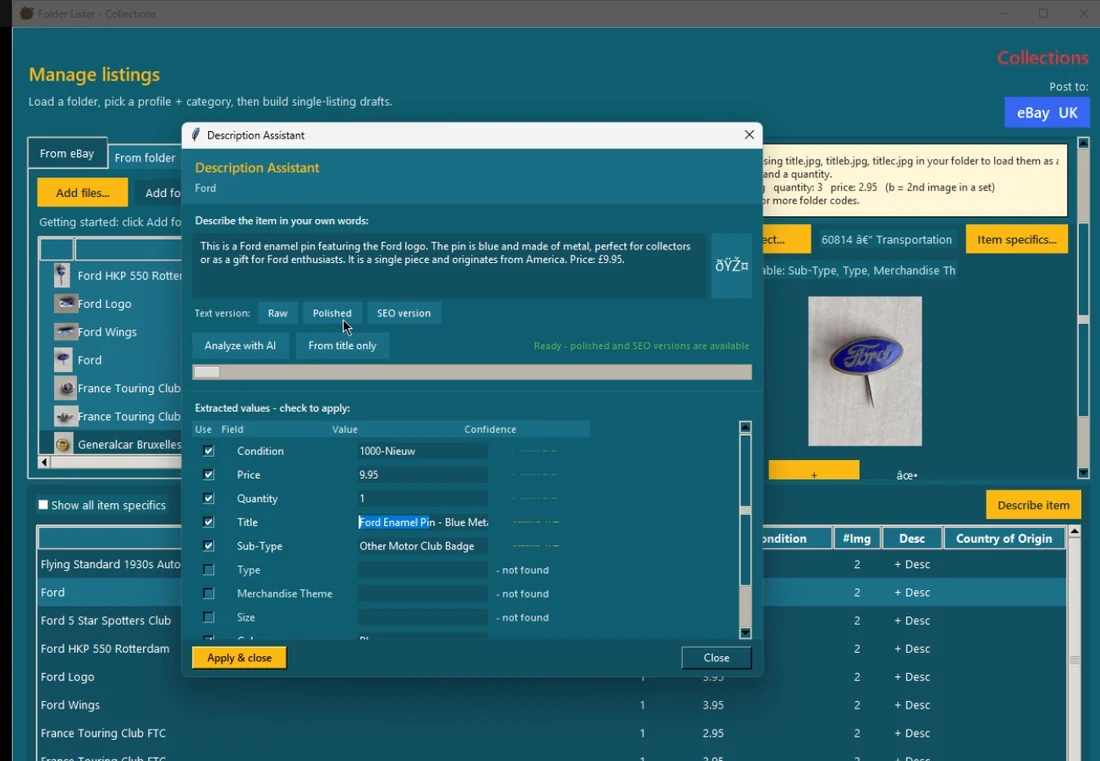
This route is useful when title codes alone cannot describe the stock. Folder Lister combines what the camera can see, what you know about the item and how you want the listing written. Suggestions remain separate from facts until you review them.
Photos suggest object type, colour, material, marks, category direction and other details that can actually be seen.
Describe damage, origin, dimensions or provenance. Say the price or quantity while the item is already in your hands.
Tell Folder Lister how to write. Choose SEO for useful search wording, factual for restrained copy, or define your own structure and tone.
The description should stay grounded in the supplied evidence. Your prompt controls style; it is not permission to make up claims.
Suggested specifics receive an accuracy score. Choose the minimum score you require, then include only the facts that meet it.
Select, edit or skip every result. Apply only your choices and continue to the next item without handing control to the AI.
AI should assist, not take over. Read the complete AI workflow or join the test and improvement team to help tune it to real listing processes.
Start free. Get your license by email, download the app, and begin with the repeatable folder workflow. Optional AI assistance is there when an item needs it.
10,000 EPS uploads per month
Cancel anytime. Manage your subscription via the Stripe customer portal.
20,000 EPS uploads per month
Cancel anytime. Manage your subscription via the Stripe customer portal.
* Launch plan details may change later. If anything changes, we will announce it well in advance.