Workflow summary
How Folder Lister approaches faster listings
Folder Lister combines local images, seller input and review-first AI into a workflow that stays close to real listing work. It does not assume the photo knows everything, and it does not hide the review step behind a one-shot draft.
The shortest version is simple: Folder Lister is desktop eBay listing software for sellers who want more speed without turning the whole listing into a black box.
The core idea
The problem is not only typing. It is stopping, deciding and waiting.
Many listing tools focus on the headline trick: take a photo, let AI guess everything, then edit what came back wrong. That can feel fast on a single casual listing. It becomes less attractive when you are working through batches, handling niche items, or trying to keep details consistent across dozens of listings.
Folder Lister takes a different route. Instead of asking AI to replace the seller, it asks AI to work inside a structure. Images provide visual clues. The seller adds the facts that matter. The system returns reviewable suggestions. That is why the product keeps coming back to the same idea: AI should assist, not take over.
"Built to augment the seller without breaking control."
This is the clearest way to describe the product philosophy behind the current site and AI pages.
What it actually does
Folder Lister's faster listing workflow, step by step
1
Start from local images, one item or a whole collection
The app is built around local folders and repeat workflows. You can begin with a single item, a batch, or an existing grouped listing you want to keep building on.
2
Record the missing facts in auto-record mode
This is where Folder Lister differs from image-only tools. You can speak the facts AI cannot safely read from a photo: condition notes, small damage, origin, quantity, variant details, pricing or other specifics that matter for the listing.
3
Let image analysis and voice notes build reviewable listing fields
The system combines both inputs into likely category suggestions, item specifics and description content. If you want a certain writing style, you can also give AI a prompt so the description follows your preferred tone instead of one generic default.
4
Review by accuracy before anything is applied
The returned specifics are not meant to disappear straight into the listing. Folder Lister brings them back with confidence signals, threshold controls and selection options so you can decide what to keep, deselect or review manually.
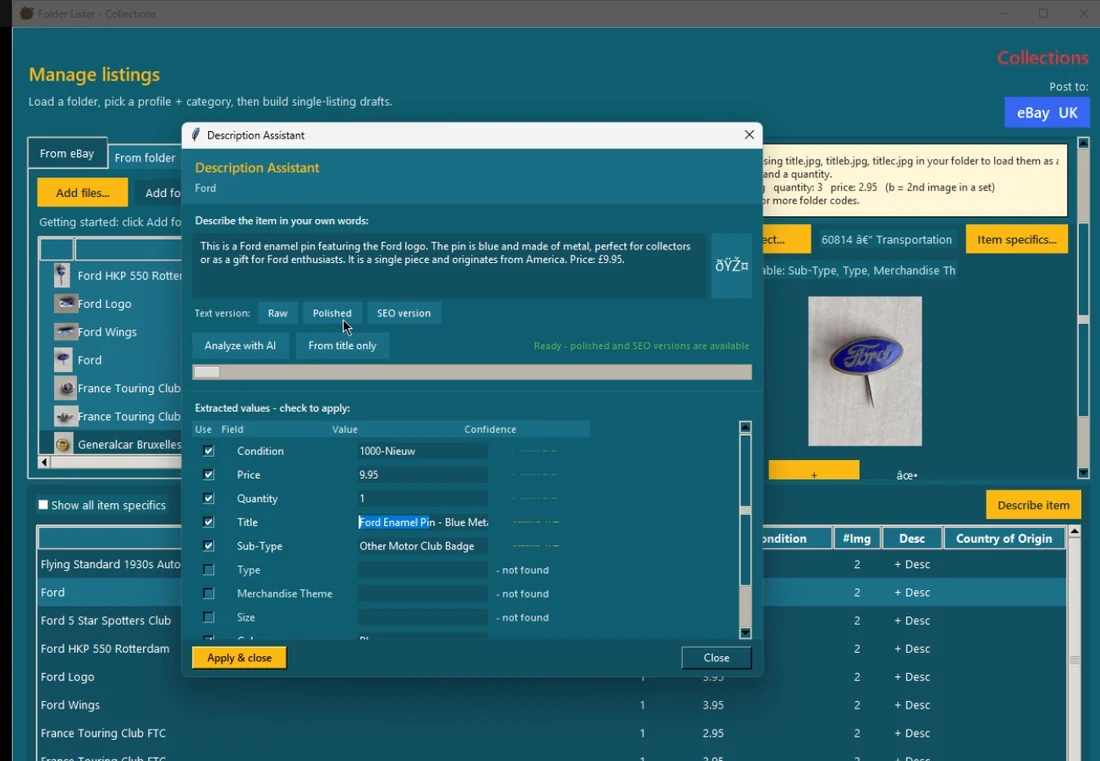
The current product story is not "one-shot AI listing generation". It is reviewable suggestions returned in a workflow the seller can still steer.
Why it can feel faster
The queue matters as much as the AI
One of the most practical ideas in Folder Lister is that voice capture does not have to freeze the rest of the workflow. In auto-record mode, you can keep moving item to item while the analysis sits in the background queue. That changes the pace of the session.
Instead of stopping after every item to wait for a result, the seller can stay in flow. That matters more in real work than many AI demos admit. A workflow that looks clever on one listing often falls apart when every item interrupts the next one.
This is also why Folder Lister still makes sense even for sellers who do not want everything to be AI-driven. The speed does not come only from generated text. It also comes from better sequencing: capture, queue, review, apply.
Where AI helps and where it does not
Good AI assistance is selective, not total
Where AI helps
Cleaning up the spoken facts into usable listing text, suggesting likely categories, returning fuller item specifics and giving the seller a more complete draft to review.
Where the seller still matters
Condition judgment, niche variants, provenance, pricing decisions, unique flaws, collection logic and knowing when a "reasonable" AI guess is still the wrong listing detail.
That tradeoff is part of the point. The goal is faster listing work, more structured drafts and better seller leverage without removing seller judgment.
Why this may help visibility
Better visibility usually comes from more complete listings, not from saying "AI"
Folder Lister's likely visibility gain is straightforward. If the workflow helps more real item facts end up in the title, item specifics and description, the listing becomes easier to understand and easier to filter. That can make the listing more complete and easier for buyers to match with.
The important part is not that AI touched the listing. The important part is that the seller's knowledge actually makes it into the final listing in a cleaner and faster way.
That is also why review still matters. Sloppy automation can produce a full-looking listing that quietly gets key details wrong. Folder Lister is strongest when it helps the seller capture more real information without hiding the review step.
The rest of the stack
The non-AI parts still matter, especially for repeat stock
Another reason this workflow is more serious than a simple AI listing app is that the product does not stop at one drafting trick. Folder Lister still includes the more structured tools that experienced sellers lean on when volume grows.
- Profiles and saved setups help bring back categories and specifics you have already dialed in.
- Country-specific mappings make it easier to attach different categories inside the same profile when you work across eBay sites.
- Title codes remain a fast non-AI route when the stock is repeatable and the setup work has already been done.
- Variation revisions and grouped listing work matter for sellers who want to reopen existing structures, add new local items or keep building collection-style listings over time.
Best fit
Who this workflow makes the most sense for
Likely a good fit
Sellers who work in batches, list enough items for setup gains to compound, care about accuracy, or want a desktop workflow that can move between single items, grouped drafts and revisions.
Probably not the first choice
Casual sellers who just want the easiest possible phone flow, or sellers whose main problem is multi-platform crossposting rather than building stronger eBay listings.
That honest positioning is part of what makes the product easier to trust. Folder Lister does not need to be the perfect fit for every seller to be very useful for the ones it is built around.
Next step
If this is your bottleneck, the next pages to open are these
If you want the tighter product pitch, open the AI workflow page. If you want setup details and actual usage steps, open the docs. If you want to see the pace in practice, watch the benchmark and short demo pages.